VS Code 插件 · 免费A free VS Code extension

VBScript,也能打断点 VBScript, now with breakpoints

能理解 COM 对象的智能提示、真正的断点调试器、兼容 cscript 的脚本宿主。让维护老脚本、自动化脚本和 WinCC 项目的人,也能用上现代编辑器。 IntelliSense that understands COM objects, a real debugger and a cscript-compatible script host — a modern editor for everyone who still maintains automation scripts and WinCC projects.

仅支持 Windows · 语法高亮在任何系统上都可用 Windows only · syntax highlighting works everywhere
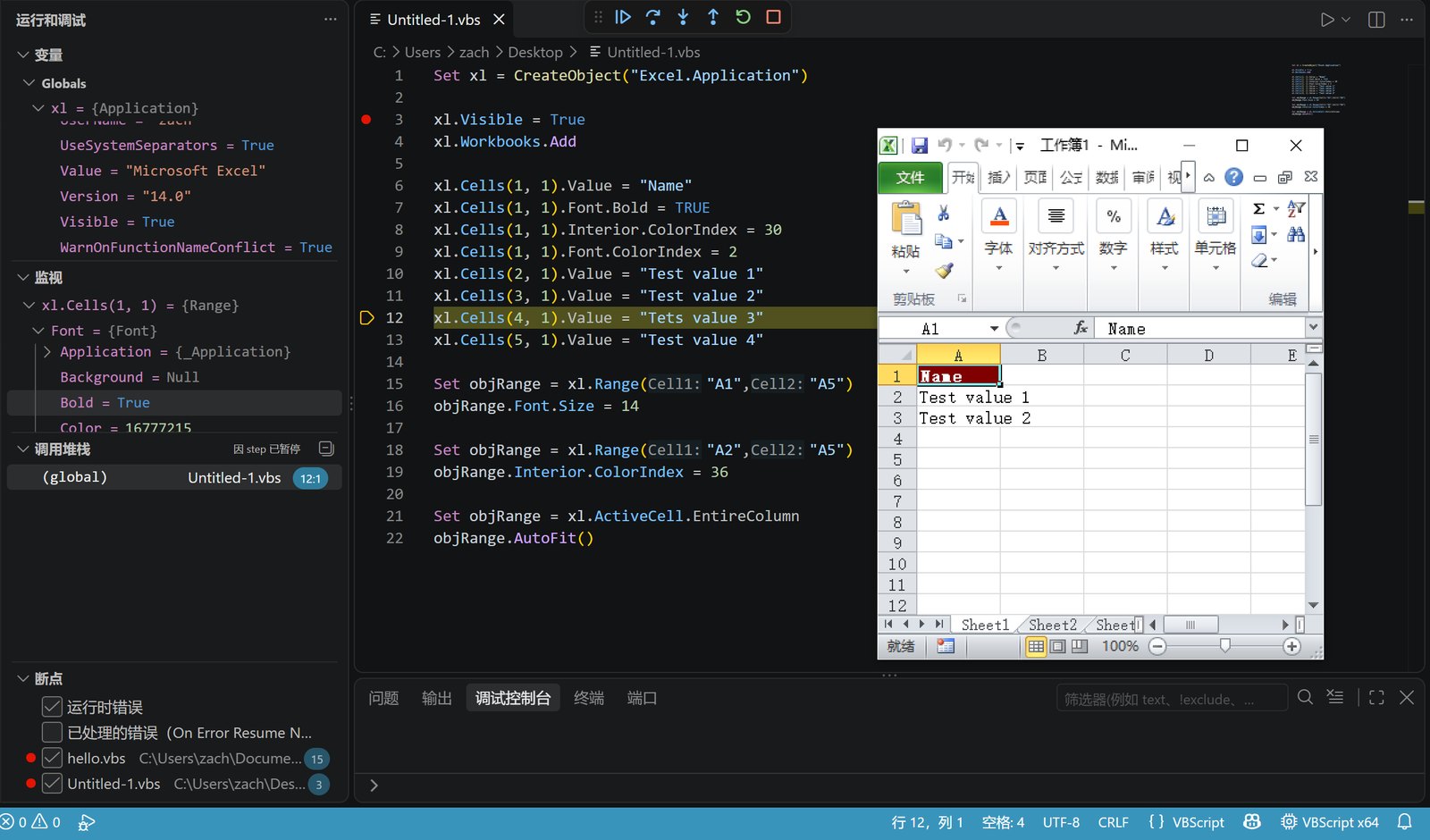
Debugging a VBScript that drives Excel: breakpoint, variables and the Excel window
TypeLib 读取 COM 类型库Reads COM type libraries 本机注册的每个组件都能补全,还会顺着代码推断类型。 Every registered component completes, and types flow through your code.
ScriptHost 重写的脚本宿主A rewritten script host cscript 没有调试接口,于是从零实现了一个兼容的宿主。 cscript has no debugging interface, so a compatible host was written from scratch.
Instrumentation 插桩调试Instrumented debugging 每条语句前插入钩子,行号不变,不干扰脚本自己的错误处理。 A hook before every statement — same line numbers, your own error handling untouched.

功能Features

写、查、跑、调,都在 VS Code 里完成。Write, check, run and debug — all inside VS Code.

IntelliSense

能理解 COM 对象的智能提示IntelliSense for COM objects

读取你电脑上注册的类型库:CreateObject(" 列出所有 ProgID,对象后面列出方法和属性。 Reads the type libraries registered on your machine: CreateObject(" lists every ProgID, and objects list their methods and properties.

  • 链式调用、For Each、With、默认成员、函数返回值都能推断
  • Types flow through chains, For Each, With, default members and return values
  • 参数提示、悬停说明、参数名提示
  • Parameter info, hover and parameter name hints
  • 推断不出时,用 ' @type 注释补上
  • ' @type annotations where inference cannot know
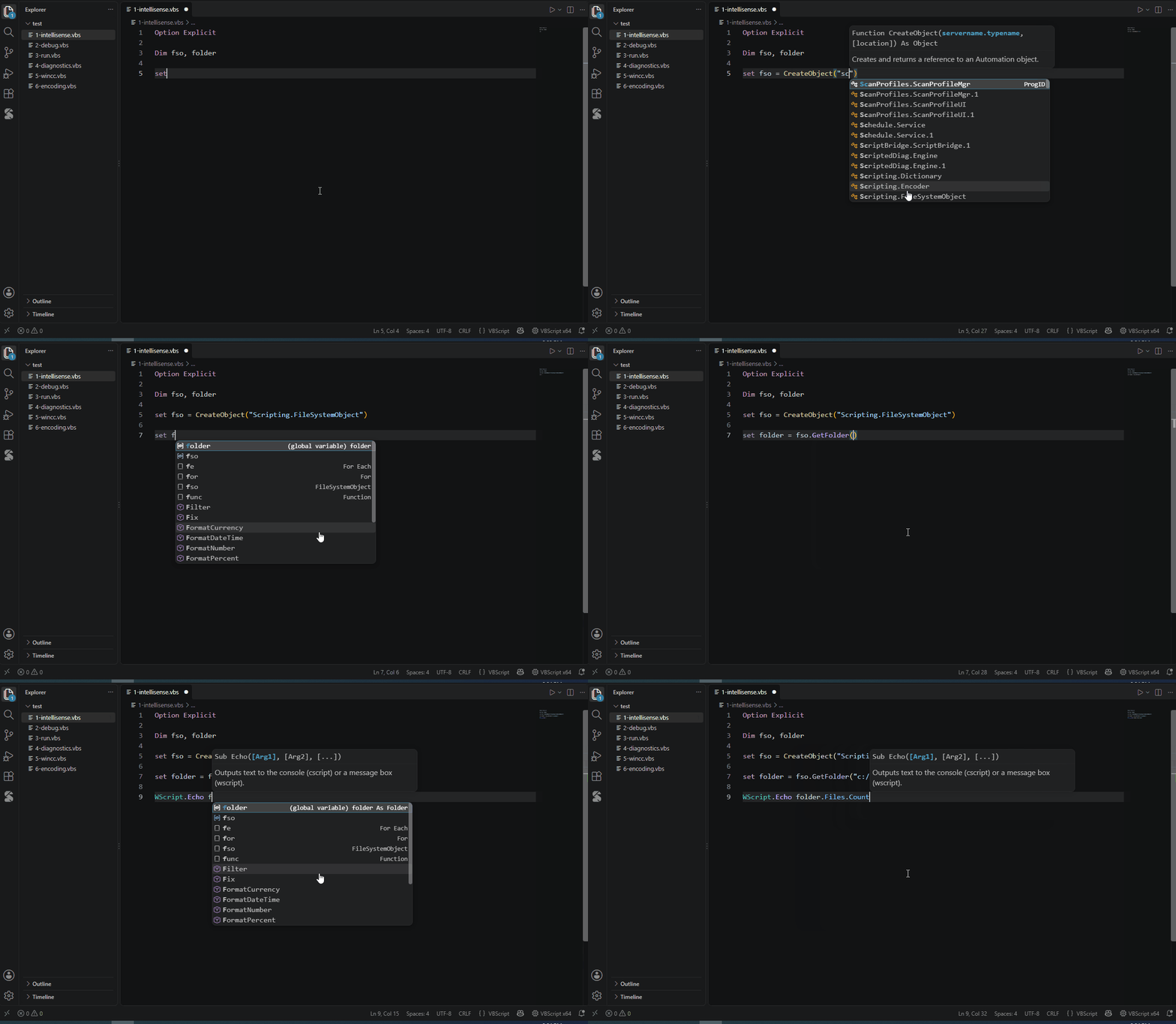
COM IntelliSense
Debugger

真正的断点调试A real debugger

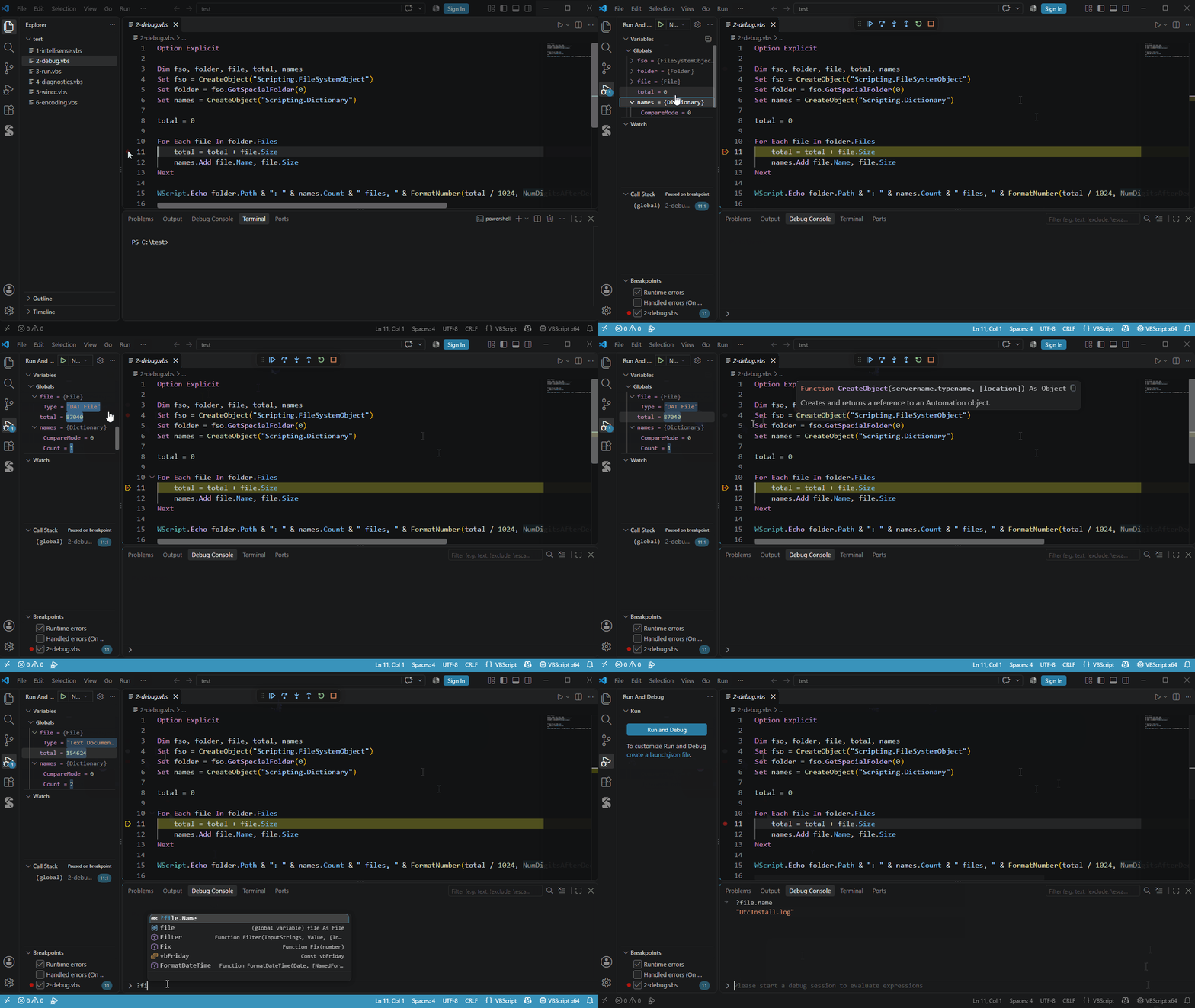
按 F5 就能调试,不需要 launch.json。Press F5 — no launch.json needed.

  • 条件断点、命中次数、日志点;单步进入 / 跳过 / 跳出
  • Conditional breakpoints, hit counts, logpoints; step in / over / out
  • 变量、监视、调用栈,COM 对象可以层层展开
  • Variables, watch and call stack — COM objects expand level by level
  • 双击修改变量;调试控制台支持补全
  • Double-click to change a value; Debug Console with completion
Debugging
Diagnostics

边写边查错Checks as you type

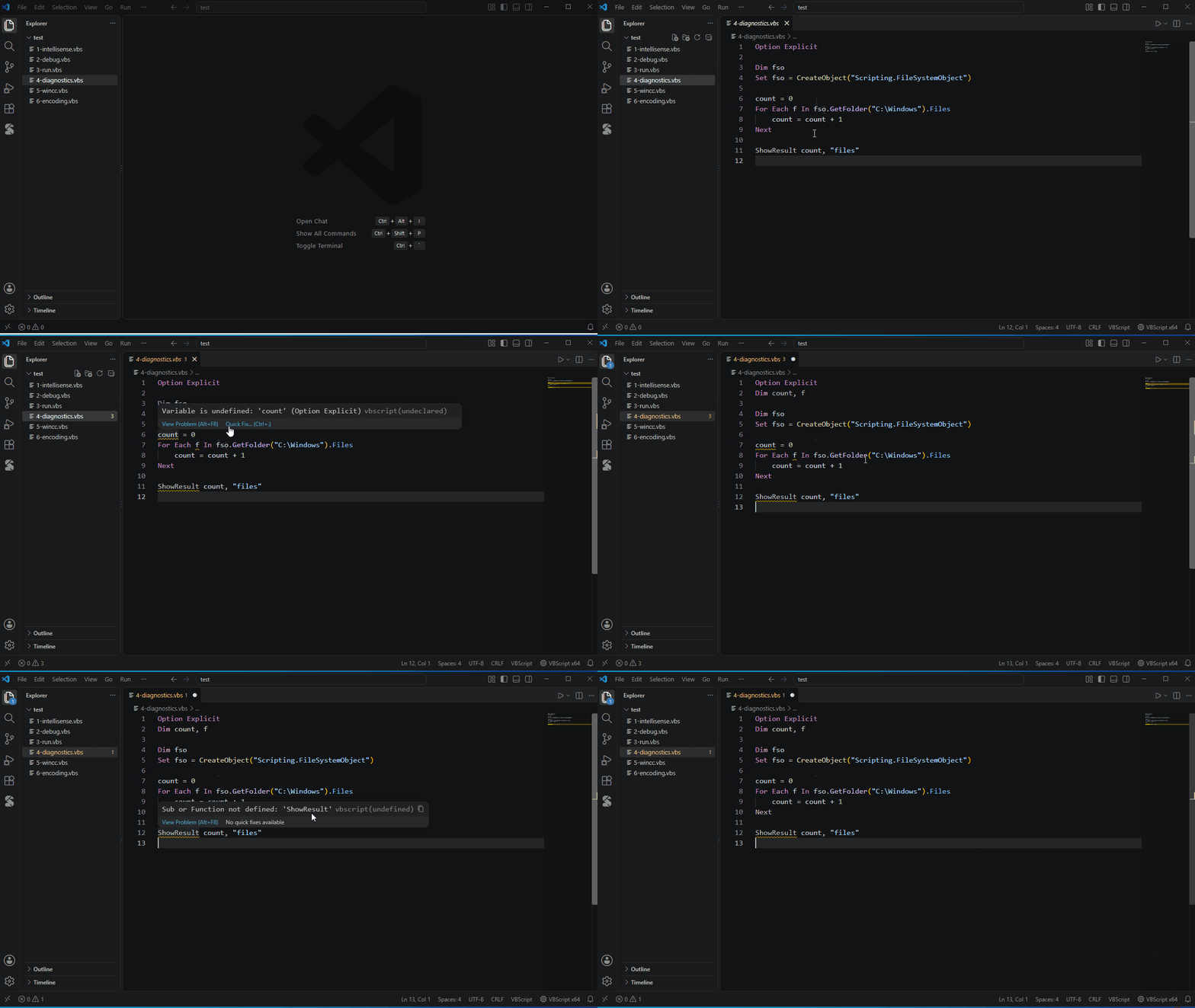
语法错误交给系统自带的 vbscript.dll 只编译、不运行,报出来的错误和真正运行时完全一致。 Syntax errors come from vbscript.dll itself — compiled, never run — so they match what a real run reports.

  • 未声明的变量、不存在的过程、参数个数错误、未使用的变量
  • Undeclared variables, unknown procedures, wrong argument counts, unused variables
  • Ctrl+. 一键修复;F12 转到定义、Shift+F12 查找引用、F2 重命名
  • Quick fixes with Ctrl+.; go to definition, find references, rename
Diagnostics
WinCC

内置 WinCC V7 / V8 对象模型WinCC V7 / V8 built in

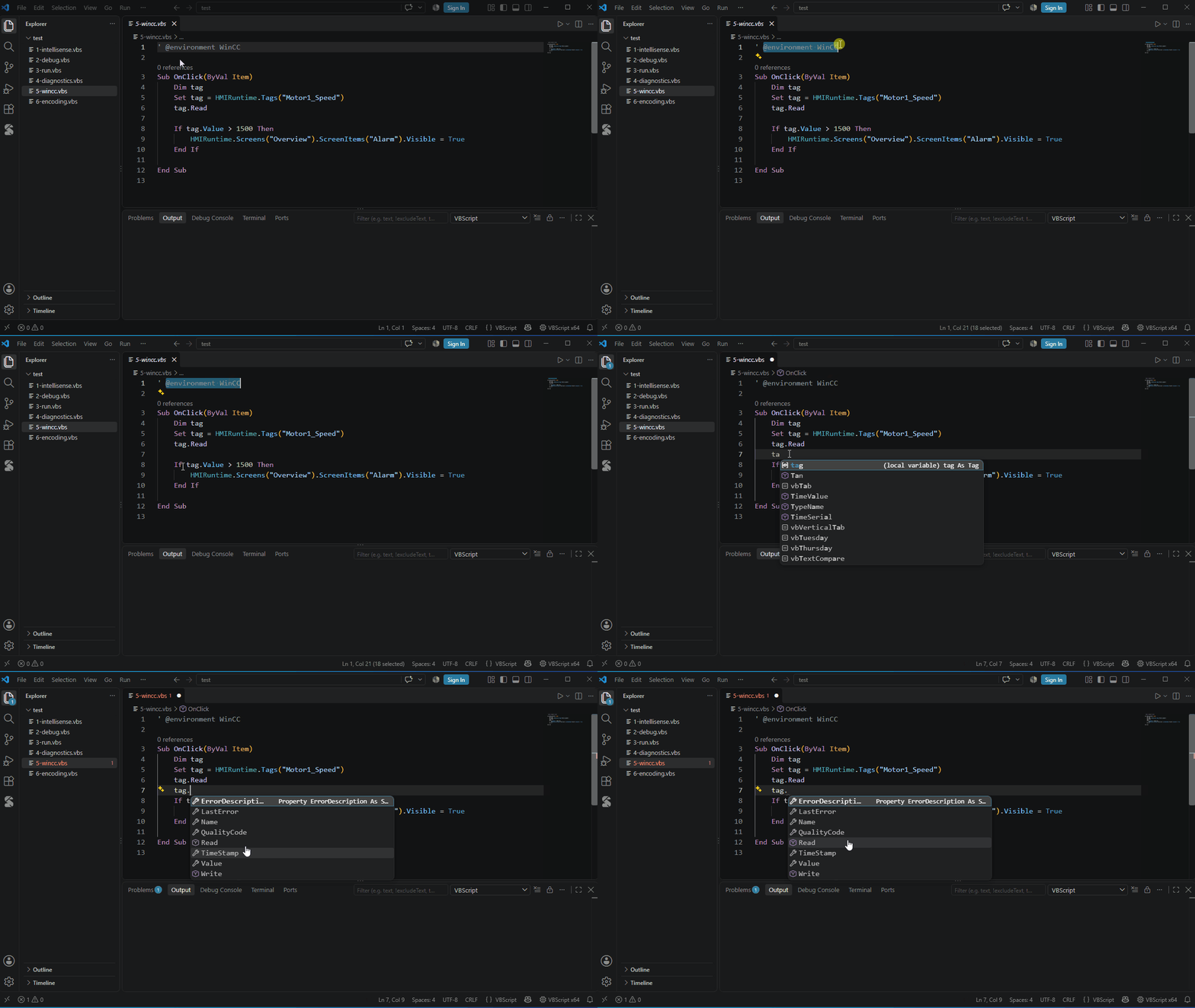
在软件内部运行、没有注册类型库的脚本,也能补全:HMIRuntime.Tags("x").Read、事件过程里的 Item.……其他软件可以用 *.vbstypes.json 自己描述。 Scripts that run inside an application get completion too: HMIRuntime.Tags("x").Read, Item. in event procedures… Describe other applications with *.vbstypes.json.

WinCC
Code Library

代码库Code Library

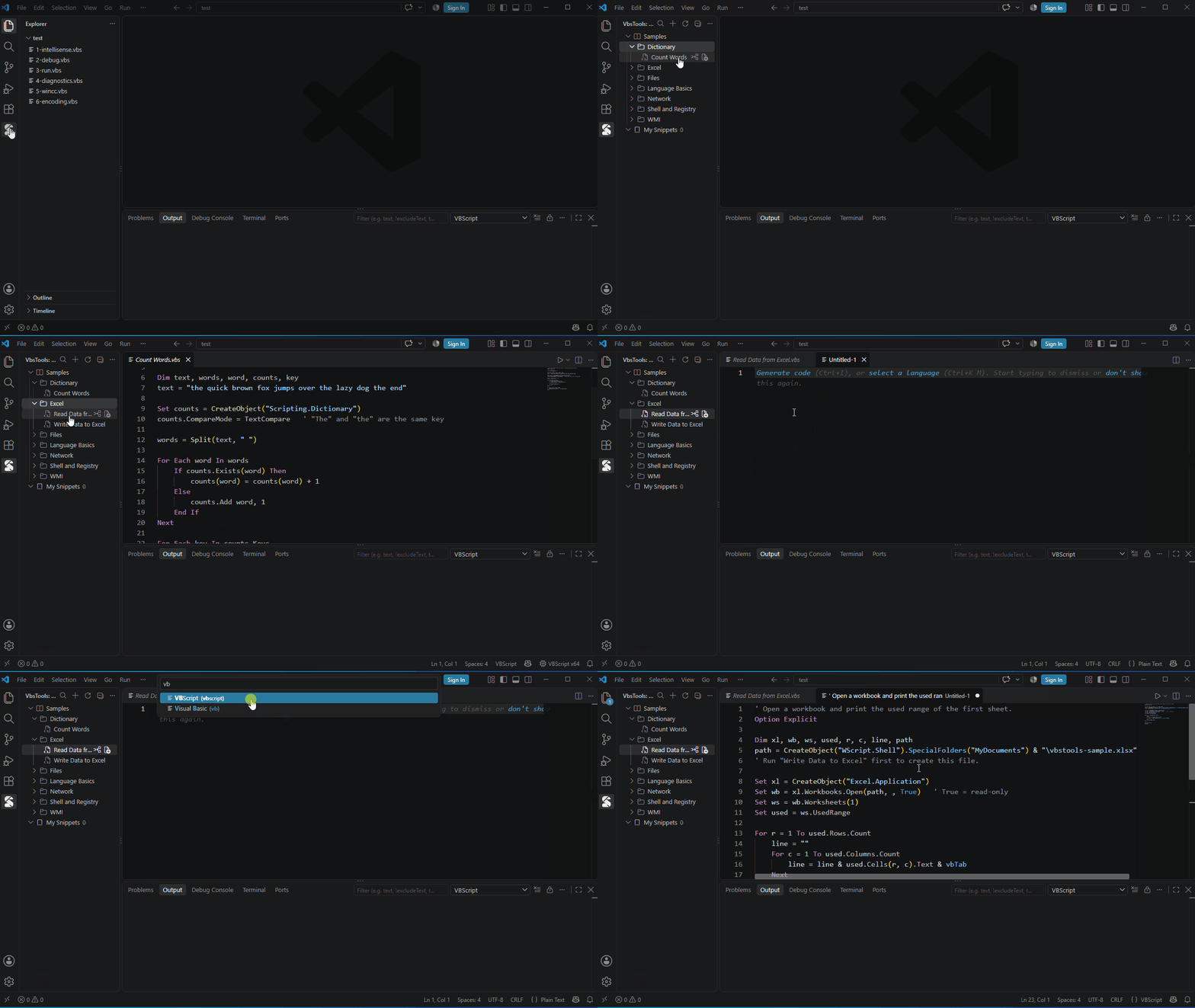
示例脚本随时预览、插入;把常用代码存成自己的片段,输入缩写就能展开。 Preview and insert sample scripts; keep your own snippets and expand them with a shortcut.

Code Library
Encoding

不再乱码No more garbled text

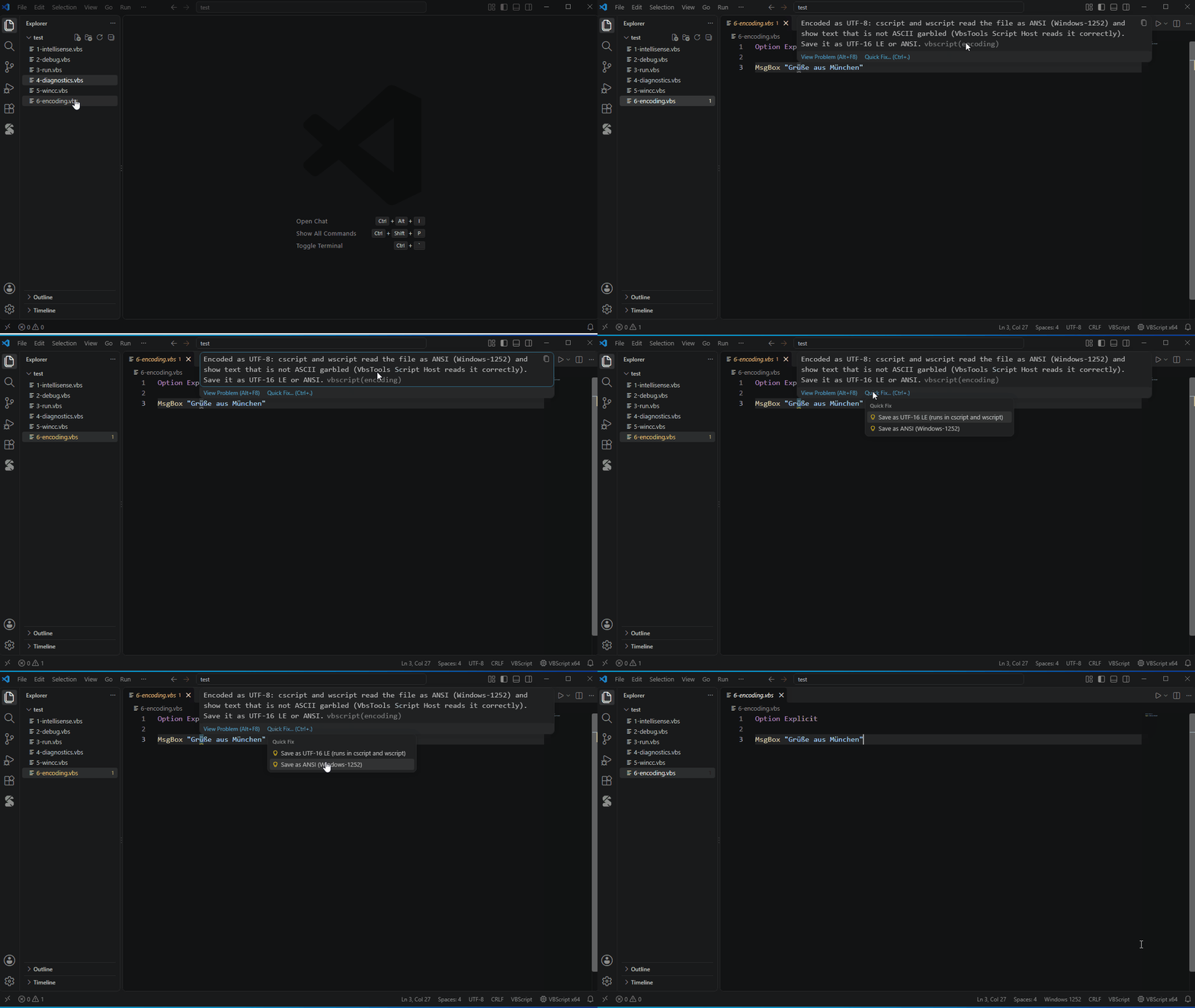
cscript 只认 ANSI 和 UTF-16。ANSI 脚本自动用系统代码页打开;含中文的 UTF-8 脚本会提示一键另存。脚本宿主本身支持中文、日文甚至 emoji 的输入输出。 cscript only reads ANSI and UTF-16. ANSI scripts reopen with the system code page; UTF-8 scripts with non-ASCII text get a one-click fix. The script host itself reads and writes any Unicode, emoji included.

Encoding

它是怎么做到的How it works

三段动画,讲清楚背后的三件事。Three short animations, three pieces of the puzzle.

类型库 + 类型推断Type libraries + inference

从 ProgID 找到注册表里的类型库,读出成员;再顺着代码推断:fso → Folder → Files → File。 From a ProgID to the registered type library and its members, then along your code: fso → Folder → Files → File.

只编译、不运行Compiled, never run

语法检查直接调用 vbscript.dll 的解析器,引擎从不进入运行状态。 The syntax check calls vbscript.dll's own parser; the engine is never started.

重写的脚本宿主A rewritten script host

加载系统的 vbscript.dll,从零实现 WScript 对象,与 cscript 逐项对照测试;Native AOT 编译,x64 / x86 两个版本。 Loads the system's vbscript.dll with a WScript object written from scratch and tested against cscript; Native AOT, x64 and x86.

介绍视频Video

六分钟看完全部功能和实现思路。All the features and the ideas behind them (in Chinese).

视频即将发布Coming soon 敬请关注 B 站on Bilibili

安装Install

一分钟装好,不需要另外安装 .NET。One minute; no .NET or anything else to install.

打开扩展视图Open Extensions

在 VS Code 中按 Ctrl+Shift+X。

Press Ctrl+Shift+X in VS Code.

搜索 VbsToolsSearch for VbsTools

点击安装。或者在命令行里:

Click Install. Or from a command line:

code --install-extension zach-shen.vbstools-vbscript
打开一个 .vbs 文件Open a .vbs file

按 F5 调试,Ctrl+F5 运行。欢迎页里有一步步的上手引导。

F5 debugs, Ctrl+F5 runs. The Welcome page has a step-by-step walkthrough.

.vbs 被识别成 "Visual Basic"? VS Code 自带的 Visual Basic 支持也会认领 .vbs,在设置里加上:

.vbs opens as "Visual Basic"? VS Code's built-in Visual Basic support also claims .vbs. Add to your settings:

"files.associations": { "*.vbs": "vbscript" }

遇到问题或有建议,欢迎到 GitHub Issues 反馈。

Problems or ideas? GitHub Issues.